METS-R HPC module
METS-R HPC is the Python orchestration layer for interactive METS-R SIM experiments. It prepares run folders, launches one or more METS-R SIM containers, connects to each simulator over WebSocket, and provides helper clients for Kafka streams, CARLA co-simulation, METS-R Vis playback, and V2X network experiments through OMNeT++/Veins or Simu5G.
The repository is now organized around direct, scriptable workflows rather than
one monolithic experiment runner. Most users start METS-R SIM with a JSON run
configuration, create a METSRClient, and call query/control methods from a
notebook or Python script.
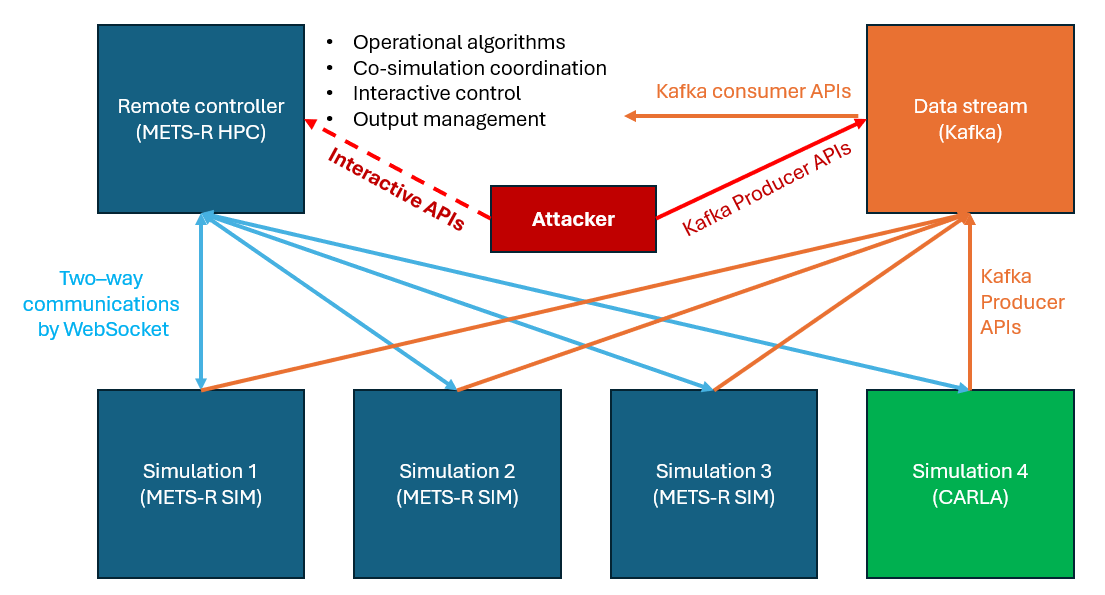
METS-R HPC framework
What the module provides
clients/METSRClient.py: the main WebSocket client for METS-R SIM. It handles tick synchronization, query/control APIs, live METS-R Vis streaming, and offline trajectory-output discovery.utils/util.py: run-configuration parsing, per-run folder preparation, Docker launch helpers, and offline visualization-server utilities.clients/KafkaDataSender.pyandclients/KafkaDataProcessor.py: producers and consumers for METS-R sensor, BSM, link travel-time, link-energy, and V2X metric streams.clients/VeinsClient.py: a TCP JSON-lines client for the OMNeT++ bridge. It sends METS-R vehicle mobility and BSM payloads withsync_tickand receives delivery, latency, loss, and attack-event records.utils/carla_util.py: helpers for CARLA vehicle spawning, coordinate conversion, route advancement, and co-simulation queue release.utils/duckie_util.py: helper functions for Duckietown message conversion and synchronization.models/AnomalyDetector.py: a lightweight example model for streaming data experiments.tutorials/andconfigs/: runnable examples and JSON run templates.veins_bridge/omnetpp/: the included OMNeT++ bridge project, including abstract V2X profiles and the Simu5G Uu backend scaffold.
Quick start
Install the Python dependencies from the METS-R_HPC repository root:
pip install -r requirements.txt
Install Docker. On Docker Desktop for Windows or macOS, enable host networking
under Settings > Resources > Network. METS-R SIM containers are launched
with --net=host so the Python clients can connect to simulator services on
localhost.
Run tutorials from the repository root so paths such as configs/...,
data/..., and docker/... resolve correctly:
jupyter lab tutorials/basic_tutorial.ipynb
A minimal script follows the same pattern used in the notebooks:
from clients.METSRClient import METSRClient
from utils.util import read_run_config, prepare_sim_dirs, run_simulation_in_docker

config = read_run_config("configs/run_interactive_NYC.json")
prepare_sim_dirs(config)
run_simulation_in_docker(config)

client = METSRClient(
    host=config.metsr_host,
    port=config.ports[0],
    sim_folder=config.sim_dirs[0],
    timeout=300,
)

client.tick(10)
print(client.query_tick())
client.terminate()
Recommended entry points
File |
Purpose |
|---|---|
|
Starts a simulator, connects a client, advances ticks, queries state, controls vehicles and services, and streams to METS-R Vis. |
|
Longer command examples for co-simulation, dynamic infrastructure, ride-hailing control, Kafka, save/load, and cleanup. |
|
Local simulator cyber-range examples using direct |
|
Interactive METS-R plus Simu5G V2X attack workflow using
|
|
CARLA/METS-R co-simulation and visualization script. |
Run configurations
Run configurations are JSON files under configs/. The common fields include
the Java path and options, METS-R SIM directory, host, random seeds, simulation
step size, data files, output settings, and optional Kafka/V2X settings.
Important conventions:
num_simulationscontrols how many simulator instances are prepared.prepare_sim_dirs(config)creates timestamped per-seed output folders and populatesconfig.sim_dirsandconfig.ports.run_simulation_in_docker(config)launches the simulator image from each prepared folder.enable_trajectory_binary_writeenables the current compact trajectory output format used by METS-R Vis.json_outputcan still be enabled for legacy JSON trajectory files.V2X configs such as
configs/run_v2x_veins_Template.jsonaddveins_host,veins_port, timeout settings, backend labels, and Kafka topics for V2X telemetry.
Interactive client APIs
METSRClient talks to one METS-R SIM instance over WebSocket. Unless noted
otherwise, methods accept either scalar inputs or lists. When lists are passed,
records are paired by index and the simulator response contains one DATA
entry per requested record. Most control calls return the raw simulator
response with top-level CODE and per-record STATUS fields.
Road IDs are SUMO/original road IDs. transform_coords=True asks METS-R SIM
to convert between the simulator coordinate reference system and WGS84
longitude/latitude when the server-side endpoint supports it.
Ticks and lifecycle
Recent METS-R SIM builds include authoritative tick values in STEP,
CTRL_reset, and CTRL_load responses. The client updates
current_tick from those responses and can query the server tick when a step
reply is slow or stale.
Method |
Use |
|---|---|
|
Return the current simulator tick reported by METS-R SIM. |
|
Return server-side stepping status, including active-road stepping fields when enabled. |
|
Advance the simulator and wait until the requested tick is reached.
|
|
Reset the simulation to its initial state and resynchronize the client tick. |
|
Save a full simulator snapshot to a zip archive. |
|
Restore a saved snapshot. Set |
|
Ask the simulator process to end. |
|
Close only the client WebSocket connection. |
State query APIs
Method |
Use |
|---|---|
|
Return public/private vehicle ID lists, or full kinematic state for selected vehicles. |
|
Return vehicles currently on selected road IDs, or grouped road records when no road is specified. |
|
Return roads currently active in the simulator stepping set. |
|
Return electric taxi IDs or taxi state, including trip, passenger, battery, and remaining-distance fields. |
|
Return taxis currently in the explicit available-dispatch pool, optionally filtered by zone. |
|
Return taxis whose active trip is within a distance threshold of completion. |
|
Return electric bus IDs or bus state, route, battery, stop, and passenger fields. |
|
Return road IDs or static and real-time road attributes. |
|
Return vehicles waiting to enter co-simulation roads. |
|
Return entering queues for all roads currently marked for co-simulation. |
|
Return road-level or lane-level centerline geometry. |
|
Return zone IDs or demand, stock, location, and service counters. |
|
Return pending taxi and bus requests across all zones or one zone. |
|
Return request status for one or more request IDs. |
|
Return taxi pickup assignments by request ID or all current pickup assignments. |
|
Return occupied taxi trip assignments by request ID or all current occupied assignments. |
|
Return signal IDs or current phase state and next-update timing. |
|
Map signal group or junction IDs to individual METS-R signal IDs. |
|
Return the signal controlling a road-to-road connection. |
|
Return charging station IDs or status, capacity, and prices. |
|
Return vehicles currently on co-simulation roads. |
|
Return the shortest route between two coordinate locations. |
|
Return up to |
|
Return the shortest route between two road IDs. |
|
Return up to |
|
Return current routing weights for selected roads or all roads. |
|
Return bus route names or stop-road sequences. |
|
Return buses currently assigned to each route. |
|
Build a local |
Co-simulation and vehicle control
Method |
Use |
|---|---|
|
Mark one or more roads as externally controlled co-simulation roads. |
|
Return one or more co-simulation roads to normal METS-R control. |
|
Release queued vehicles onto co-simulation roads after inspecting
|
|
Teleport a co-simulation vehicle to absolute coordinates with heading and speed. |
|
Teleport a trace-replay vehicle by downstream lane distance, or by
|
|
Force a co-simulation vehicle onto the next road, optionally overriding the planned route. |
|
Mark a co-simulation vehicle as having reached its destination. |
|
Override vehicle acceleration for the current tick. |
|
Change the vehicle sensor type, for example |
|
Replace a vehicle route with an ordered list of road IDs. |
Private trips, taxis, and transit
Method |
Use |
|---|---|
|
Generate a private-vehicle trip between zones. |
|
Generate a private-vehicle trip between road IDs. |
|
Create taxi request records and return request IDs for later dispatch or cancellation. |
|
Create taxi requests between road IDs. |
|
Match available taxis to existing pending taxi requests. |
|
Cancel one or more taxi or bus requests. The client can infer origin
zones from request records or |
|
Reposition idle or cruising taxis to destination zones. |
|
Send idle taxis to a target parking zone or road. |
|
Create bus request records for later assignment. |
|
Assign pending bus requests to active buses. |
|
Add a bus route with stop zones, stop roads, and optional explicit paths between stops. |
|
Schedule a bus departure on an existing route. |
|
Insert a stop into an active bus route. |
|
Remove a stop from an active bus route. |
Routing, charging, signals, and infrastructure
Method |
Use |
|---|---|
|
Update routing weights such as travel time or energy cost. |
|
Update road parking capacity with any of the supported capacity argument names. |
|
Update charging prices by station and charger type. |
|
Send private EVs or public taxis to a selected or automatically chosen charging station. |
|
Force a traffic signal to a target phase. |
|
Update a signal’s fixed-time durations in ticks. |
|
Set a complete signal phase plan using seconds. |
|
Set a complete signal phase plan using simulation ticks. |
|
Add zones dynamically and attach them to nearby roads. |
|
Remove zones when no active vehicles, requests, or routes still reference them. |
|
Add generated roads or pass fully formed simulator road records. |
|
Remove roads when doing so will not strand vehicles, requests, routes, or facilities. |
|
Add charging stations dynamically. |
|
Remove charging stations when no vehicle is queued, charging, or en route there. |
|
Spawn electric taxis at selected zones. |
|
Spawn electric buses on selected routes. |
Visualization and trajectory helpers
METS-R SIM now writes compact binary trajectory chunks with a manifest.json
by default when enable_trajectory_binary_write is enabled. The manifest
describes the byte order, schemas, chunk list, road/zone/charging-station
dictionaries, and sparse zone/charging-station frame groups. Older JSON
trajectory files are still supported by the discovery helpers.
There are two visualization modes:
Live streaming:
start_viz()opens a WebSocket stream for METS-R Vis. Open the METS-R Vis web app, click Stream, connect to the printedws://...URL, and callrender()whenever you want to push the current simulator state.Offline playback:
start_offline_viz()serves an existing trajectory output directory over HTTP so the METS-R Vis web app can replay it.
Method |
Use |
|---|---|
|
Start a live WebSocket stream for METS-R Vis. It can include public vehicles, private vehicles, links, zones, and charging stations. |
|
Query the current METS-R tick and send one live frame to connected METS-R Vis clients. |
|
Stop the live WebSocket stream. |
|
Find the newest trajectory output directory, preferring binary output. |
|
Read the manifest for the latest or selected binary trajectory output. |
|
Return compact metadata about the latest trajectory output. |
|
Serve a trajectory output directory for offline playback. |
|
Stop the offline HTTP server. |
|
Stop both live and offline visualization servers if they are running. |
CARLA co-simulation
tutorials/cosim_example.py demonstrates the current CARLA workflow. The
script reads a CARLA run configuration, starts the auxiliary Docker services,
launches METS-R SIM, connects a METSRClient, marks METS-R roads as
co-simulation roads, and mirrors METS-R vehicles in CARLA.
Common options include:
python tutorials/cosim_example.py -r configs/run_cosim_CARLAT5.json -v
CARLA settings such as carla_dir, carla_host, carla_port, and
carla_map live in the selected run configuration. The client-side controls
listed above, especially set_cosim_road, query_entering_vehicle_queue,
enter_road_from_queue, teleport_cosim_vehicle, enter_next_road, and
reach_dest, are the low-level API calls behind the co-simulation loop.
Kafka streams
Kafka is optional and is used when an experiment needs explicit data-stream modeling or a cyber-physical data pipeline. Start the auxiliary stack from the HPC repository root:
cd docker
docker-compose up -d
The default V2X template uses localhost:29092 and topics such as
link_tt, link_energy, bsm, v2x_tx_bsm, v2x_rx_bsm,
v2x_link_metrics, and v2x_attack_events.
KafkaDataProcessor normalizes old and new payload schemas and exposes
specialized handlers for BSM, transmitted BSM, received BSM, link metrics,
attack events, link travel time, and link energy. KafkaDataSender is the
matching lightweight producer for experiment scripts.
OMNeT++/Veins and Simu5G V2X
The V2X path is a separate TCP JSON-lines bridge between Python and OMNeT++.
METS-R SIM remains the traffic simulator. VeinsClient sends vehicle
mobility, BSM payloads, and optional attack events to the bridge once per METS-R
tick. The bridge returns delivered BSMs, per-message link metrics, dropped
messages, latency, attack events, and backend metadata.
Build and run the real Simu5G NR Uu backend from WSL:
export OMNETPP_HOME=~/src/omnetpp-6.1
source "$OMNETPP_HOME/setenv"

cd ~/src/METS-R_HPC/veins_bridge/omnetpp
bash ./check_sim5g_env.sh
bash ./build_sim5g.sh
bash ./run_sim5g_uu.sh
The Uu run script starts the bridge on TCP port 9099 by default after adding
the generated Simu5G NED files and the local INET/Simu5G libraries to the
runtime path.
For the V2X workflow documented here, use the sim5g_cellular_uu backend
profile:
Config |
Backend label |
Meaning |
|---|---|---|
|
|
Real Simu5G/INET NR Uu backend. METS-R vehicle positions update UE mobility, BSM payloads are injected into Simu5G UE applications, and delivery is reported from the network receive path. |
Open the Python notebook workflow after METS-R SIM and the bridge are listening:
jupyter lab tutorials/security_sim5g_v2x_examples.ipynb
The notebook connects METS-R vehicle states to the OMNeT++ bridge with
VeinsClient.sync_tick() and lets the sim5g_cellular_uu backend report
delivery, loss, latency, and attack-event records from the real 5G Uu path.
VeinsClient API summary:
Method |
Use |
|---|---|
|
Basic bridge handshake, health check, and reset calls. |
|
Send vehicle mobility records without sending BSMs. |
|
Send BSM records to the bridge. |
|
Send attack-event records to the bridge. |
|
Advance only the network side for one tick. |
|
Preferred call for coupled experiments. It returns |
The stable bridge protocol accepts hello, ping, reset, and
sync_tick. sync_tick receives vehicles, bsm_messages, and
optional attacks. Message records should include stable matching fields such
as message_id, sender_id, receiver_id, tx_time_s,
radio_mode, payload_bytes, and BSM semantic fields such as x, y,
speed_mps, and heading_deg.
Practical notes
Run commands from the
METS-R_HPCrepository root unless a bridge command explicitly changes intoveins_bridge/omnetpp.The Python clients expect simulator and bridge services on
localhostby default. If the OMNeT++ bridge runs in WSL and Windows cannot reach 127.0.0.1, set the bridge host in the notebook or update the run config.Restart notebook kernels after changing client source files. Existing Python objects keep the old class definitions in memory.
OMNeT++
Cmdenvprogress lines count bridge polling and scheduled delivery events as well as user traffic, so high event counts do not necessarily mean high BSM volume.Use the
sim5g_cellular_uuprofile for the documented real Simu5G NR Uu V2X workflow.